In private beta · Free while in beta

What's for dinner?
Your kitchen already knows.

FoodGenie is the AI-powered kitchen for people who actually cook. It plans your meals, tracks what's in your fridge, builds your shopping list, and never lets the basil wilt unnoticed.
Invite-only betaFree while in betaYour data stays yours
No code? Join the waitlist
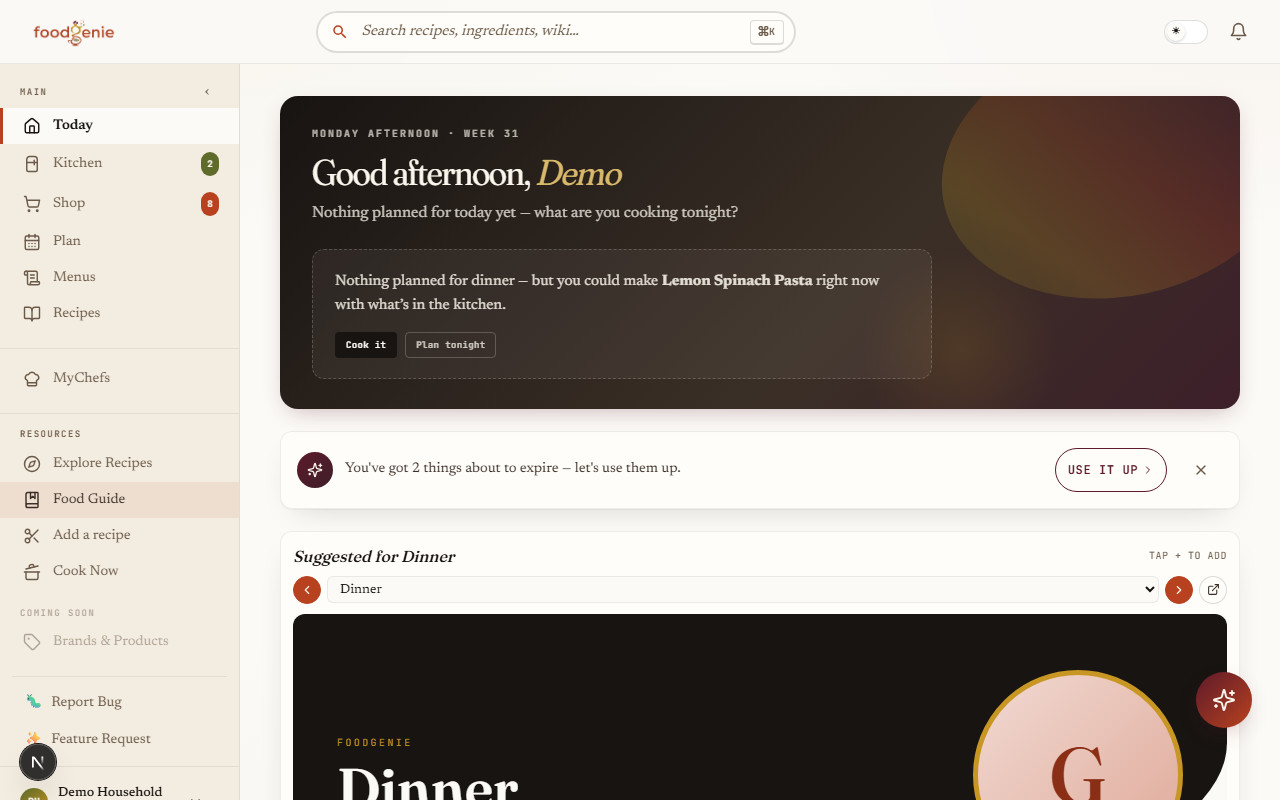
The FoodGenie dashboard — tonight's plan, use-it-up items, and this week at a glance
10min
to plan a full week of meals
Less waste
cook what you buy — before it expires
One answer
to the nightly “what's for dinner?” argument
The intelligence loop

One connected kitchen.
Six things that finally talk to each other.

Every meal-planning app does one or two of these. FoodGenie does all six — and the magic is they share the same brain.

01 · Import
Recipes
URL, photo of a cookbook, or paste plain text — parsed in seconds with confidence chips.
02 · Curate
Your menu
A restaurant-style catalog of what your family actually eats — your source of truth.
03 · Plan
Weekly meals
Drag, auto-fill, or let the Genie suggest. Considers what's expiring + last week.
04 · Shop
Smart list
Subtracts what's in your kitchen. Departments. Cost estimates. Kroger-ready.
05 · Cook
Hands-free mode
Big text. Inline timers. The Genie answers “what's next?” while your hands are messy.
06 · Track
Auto inventory
Bought it? Inventory adds. Expiring? You're alerted. Your kitchen list stays current without the chore.
The product, not promises

This is actually what it looks like.

Real screenshots from the live app — the same ones our guides use. No mockups.

Meal Planner

Plan any seven days — in about ten minutes.

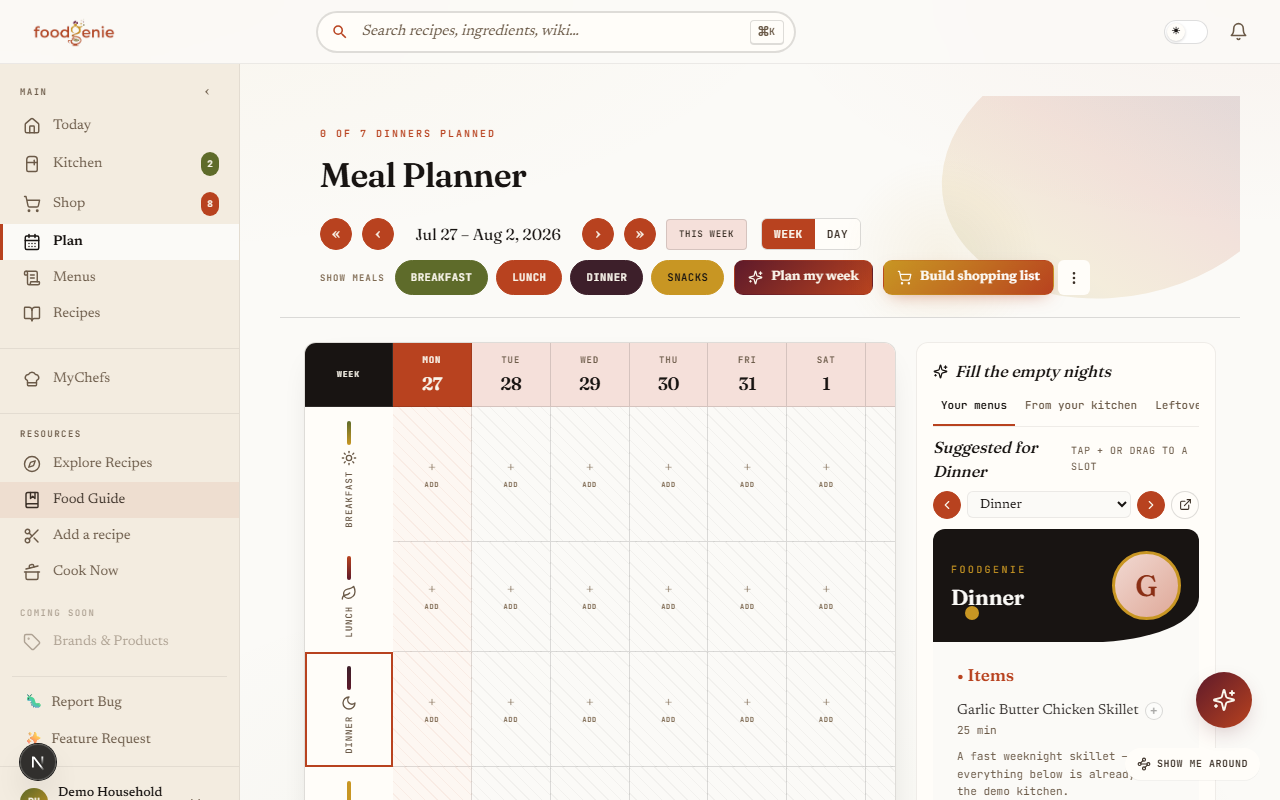
A fluid week that scrolls by the day, not locked to Sunday-through-Saturday. Drag dishes straight off your styled menus, let “Plan my week” fill the empty nights from what's in your kitchen, or reuse any past week day-by-day.

  • Green/red bars show which dinners you can cook tonight
  • Desserts never show up as dinner suggestions
  • Past Plans: reuse any earlier week, checkbox by day
See the planner guide →
The FoodGenie meal planner — a week grid with recipe cards, meal filters, and the styled-menu rail
Shopping List

A list that writes itself — and knows your store.

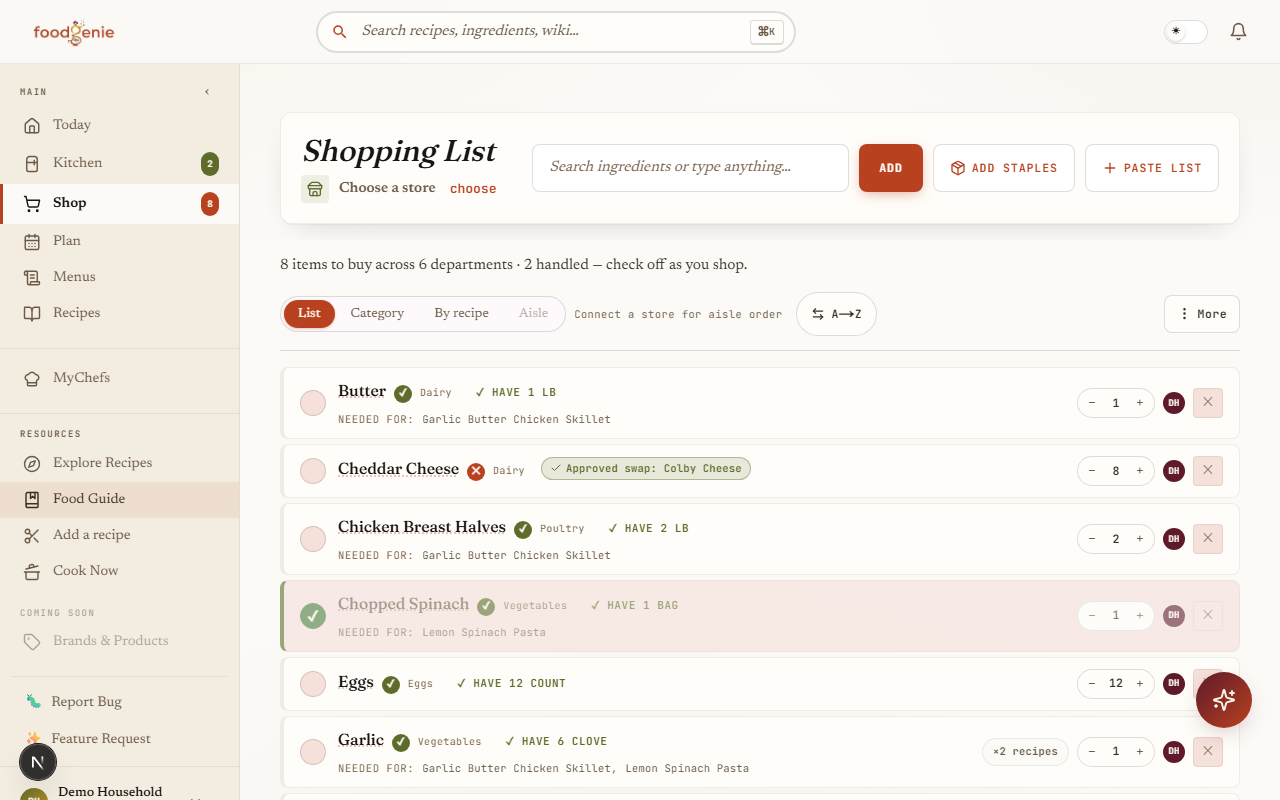
One tap builds the list from your plan, subtracting what's already in your kitchen. Group it by category, by recipe (“needed for: Pork Souvlaki”), or by your store's actual aisles with live Kroger prices — then send it straight to your cart.

  • “Have it already” and pantry-substitute flags per item
  • Live prices + aisle order when a store is connected
  • Check-off mode keeps your screen awake in the aisle
See the shopping guide →
The FoodGenie shopping list grouped by department, with recipe attribution and have-it-already flags
MyKitchen

Your kitchen, tracked — without the chore.

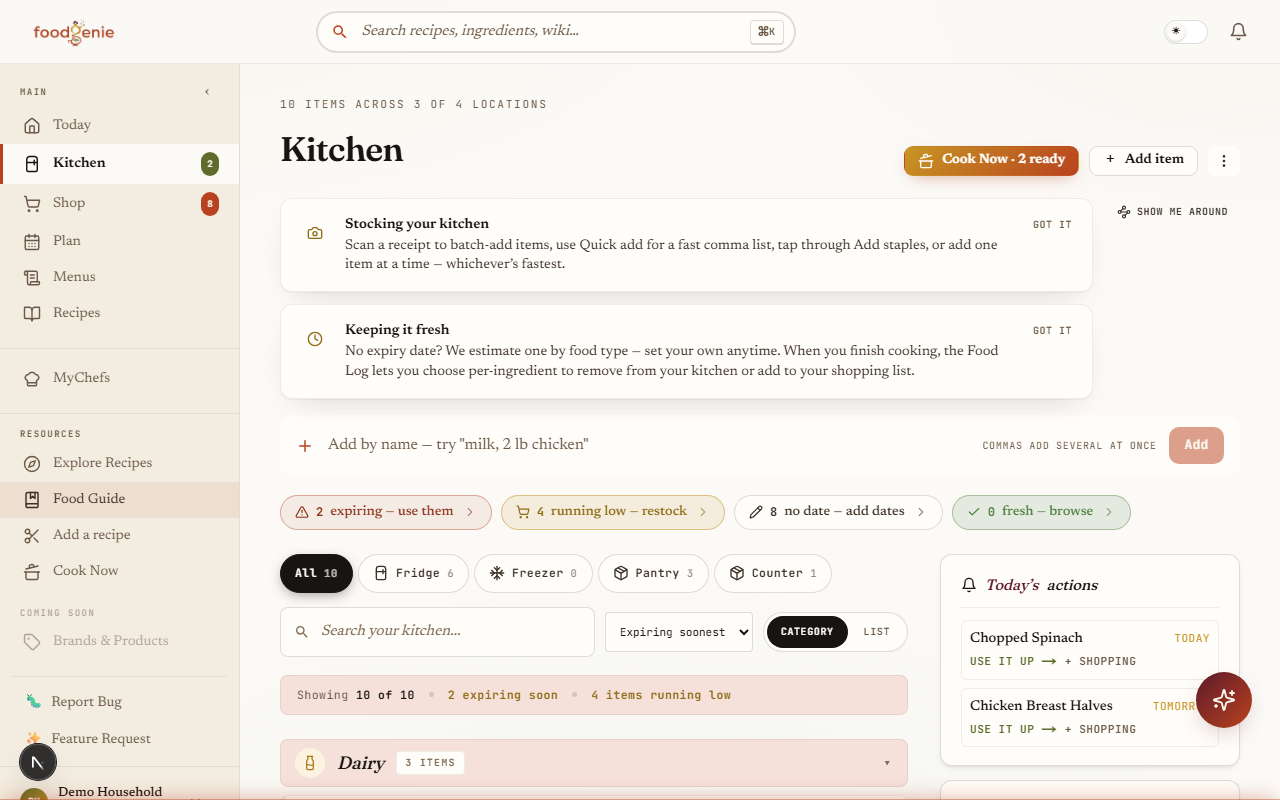
Stock it by scanning a receipt, pasting a list, or tapping through staples. Expiry dates are estimated by food type, “use it up” surfaces what's about to turn, and the weekly five-minute Kitchen Check keeps it honest.

  • Expiring / running-low / no-date filters, one tap each
  • Receipt scanner batch-stocks and checks off your list
  • Leftovers tracked with their own clocks
See the kitchen guide →
MyKitchen inventory grouped by category with expiry chips and quick filters
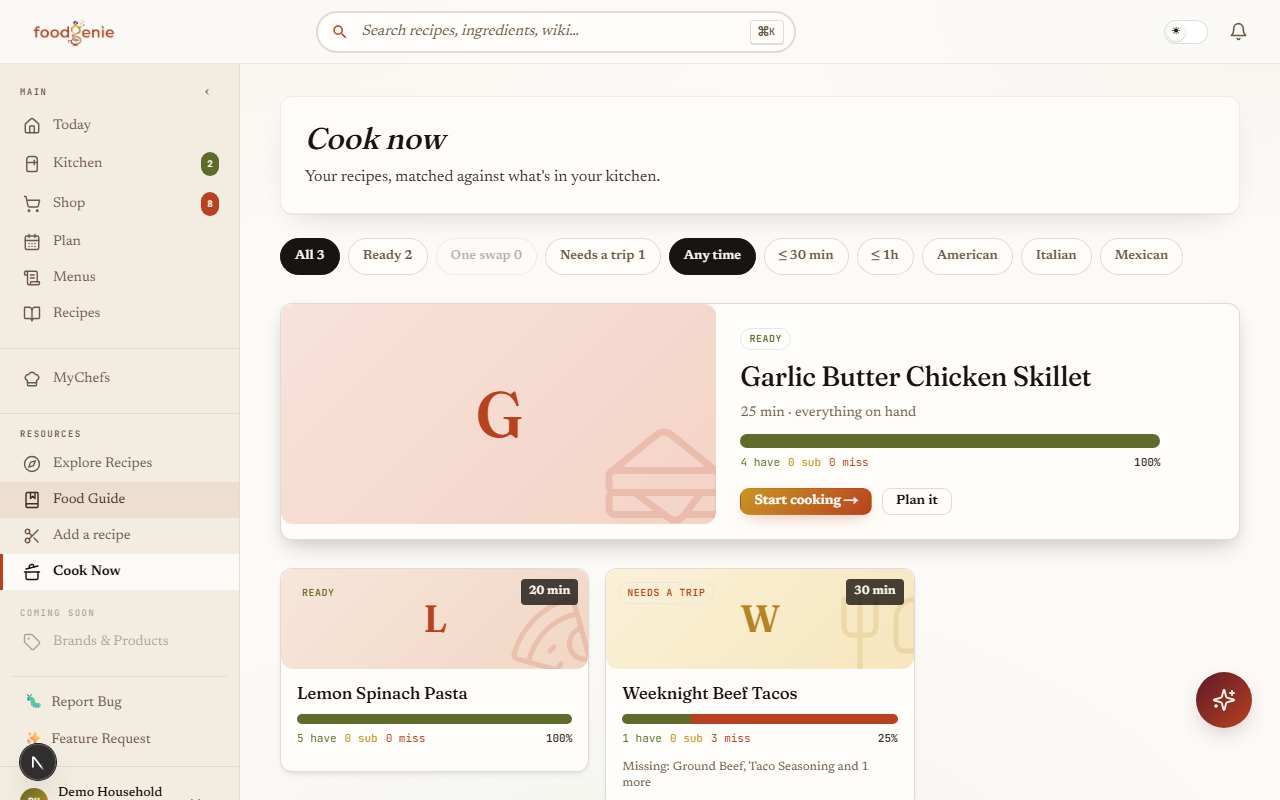
Cook Now

Dinner from what you have, ranked honestly.

Every recipe you own, scored against your actual kitchen: ready right now, one smart substitution away, or missing a few things. The substitution graph is curator-built and allergen-aware — never an AI guess.

  • Ready · 1 swap · needs-items tiers at a glance
  • Filters by cuisine and dietary pattern
  • One tap from “can make” to tonight's plan
See the guide →
Cook Now — recipes tiered by ready now, one swap away, and needs a shopping trip
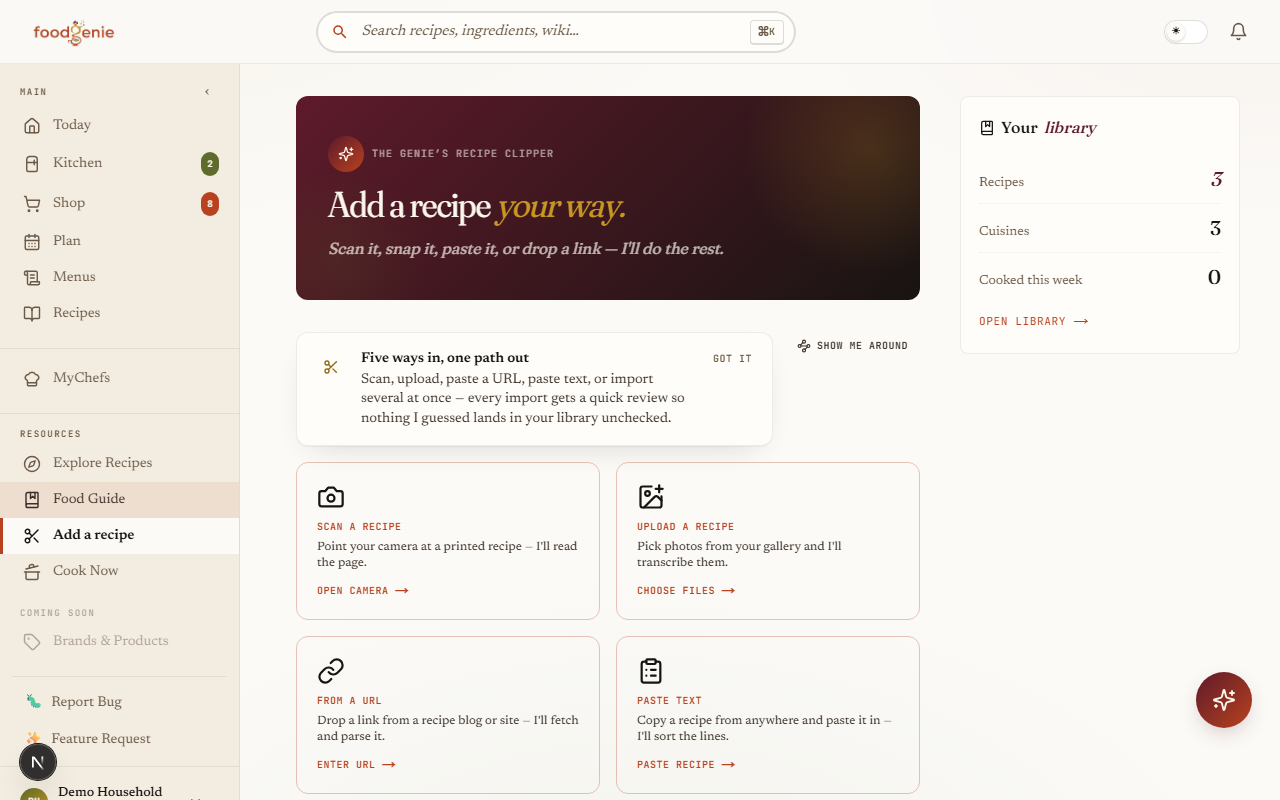
Recipe Clipper

Grandma's index card → your library, in seconds.

Paste a URL, snap a cookbook page, or photograph a recipe card. The Clipper parses it with confidence chips, walks you through a quick review, and files it in MyRecipes — servings, times, and ingredients structured and plannable.

  • URL, photo, and plain-text import paths
  • Mandatory review step — nothing garbled sneaks in
  • Every import becomes drag-and-droppable in the planner
See the clipper guide →
The Recipe Clipper import screen with URL, photo, and text options
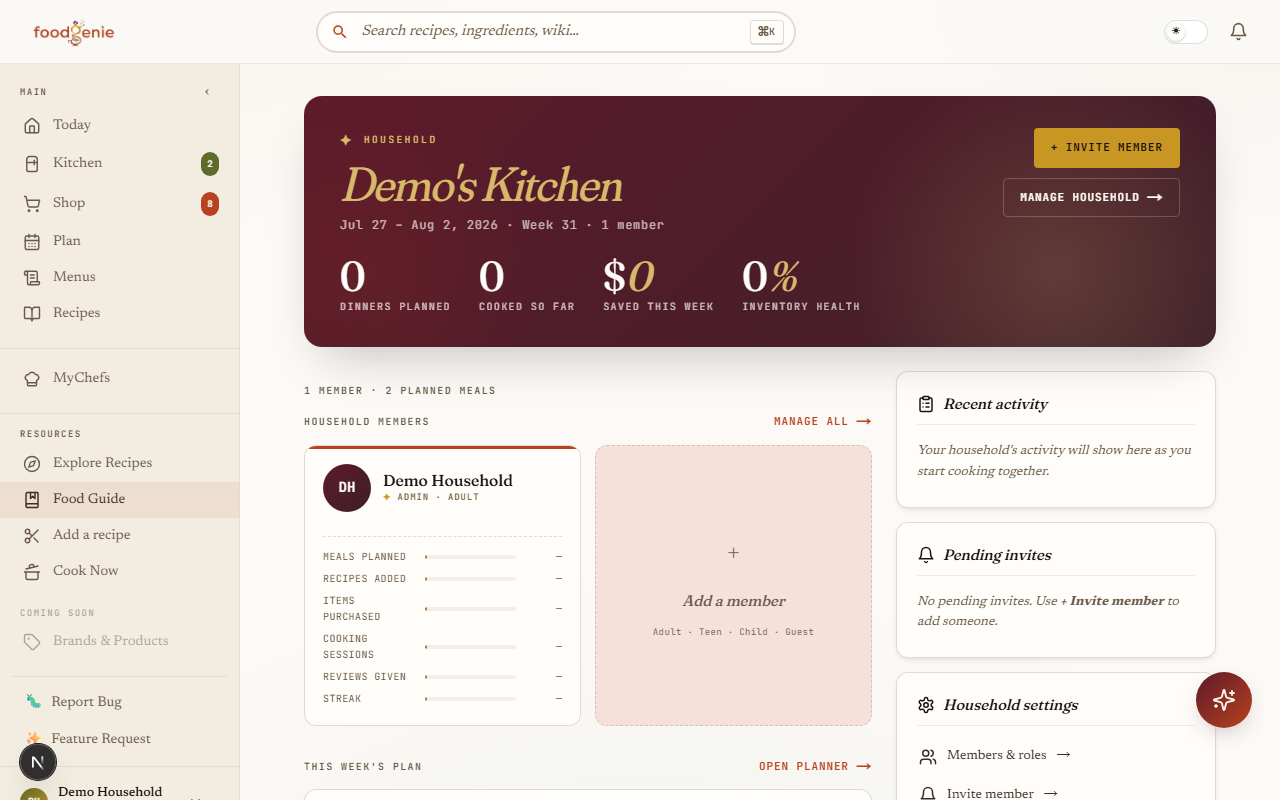
Household & MyChefs

Cook together — at home and beyond it.

One shared kitchen, plan, and list for the whole household — with per-person dietary profiles and a Fair Play tracker so cooking doesn't fall on one person. Then connect with friends on MyChefs and browse their shared menus in their own designs.

  • Real-time shared planner and shopping list
  • Friends' menus render in their chosen themes
  • “+ Plan” a friend's dish straight into your week
See the sharing guide →
The household view — shared members, contributions, and activity
The Genie

Like having a chef-friend who knows your fridge.

Ask anything. The Genie answers using your menu, your inventory, your dietary profile, and what you've already planned. No more “I have 4 ingredients, what can I make?” rabbit holes.

What's a quick dinner using just what I have?
Can I substitute yogurt for buttermilk in this recipe?
Why is my pasta water this cloudy?
Try the Genie →
Honest pricing

Free to start. Pro when you're hooked.

No surprises. Cancel anytime. Annual saves 29%. Household plans share with up to 6 family members.

Free forever
Starter
$0/month
No card · No expiry
  • Up to 25 recipes
  • Full menu + planner
  • Inventory tracking
  • 3 Genie messages/day
  • 1 substitution per ingredient
  • MyChefs social
Join the beta →
Pro · Annual
FoodGenie Pro
$4.99/month
$59.88 billed yearly · save 29%
  • Unlimited recipes + Genie chat
  • Smart planner auto-fill
  • Recipe Clipper (cookbook OCR)
  • Voice mode in cooking
  • Multi-substitution dietary filtering
  • Ad-free everywhere
Join the beta →
Household · Annual
Family
$7.49/month
$89.88 billed yearly · up to 6 members
  • Everything in Pro
  • Shared inventory + planning
  • Per-member dietary profiles
  • Child profiles
  • Fair Play contributions
  • Real-time collaborative planner
Join the beta →
Pricing applies after public launch — beta is free.
From the beta kitchen

What we're hearing from early testers.

Beta-tester notes
“It's the first meal-planning app where the AI actually feels useful. The Genie suggested using my wilting basil before I would have noticed.”
From our beta-tester notes · on the Genie
Beta-tester notes
“Saturday morning planning used to take 40 minutes of arguing. Now it's coffee + 10 minutes. The shopping list literally writes itself.”
From our beta-tester notes · on planning
Beta-tester notes
“I have a tree-nut allergy and every other recipe app eventually suggested almond butter. FoodGenie never has — that's the standard.”
From our beta-tester notes · on allergens
Common questions

Things real people ask.

Is FoodGenie really free?+
Yes — the Free tier is a real product, not a demo. You get unlimited menu, inventory, planner, and shopping list. The cap is 25 imported recipes and 3 Genie messages/day. We make money when power users upgrade to Pro for unlimited everything.
Do you sell my data or use it to train AI?+
No. Never. Your recipes, plans, and Genie conversations stay yours. We have signed Data Processing Addendums with our LLM providers (Anthropic, OpenAI) that explicitly prohibit training on your data. You can download or delete everything from your settings page.
How is FoodGenie different from Mealime, Paprika, AnyList, or Whisk?+
Most apps do one piece of the kitchen well — recipe storage (Paprika), shopping lists (AnyList), or auto-generated meal plans (Mealime). FoodGenie connects all six pieces — import, menu, plan, shop, cook, track — so they share one brain. The Genie chat is the difference: it knows your inventory, your menu, and your dietary needs, and it answers in seconds.
Can my whole family use one account?+
Get the Household plan ($7.49/mo annual). It supports up to 6 members with their own dietary profiles, child profiles, and a real-time collaborative planner. Inventory and menu are shared. There's even a “Fair Play” contributions tracker so cooking duties don't fall on one person.
Will it work on my phone?+
Yes. The web app is mobile-responsive — everything works in your phone's browser, including the camera tools (Recipe Clipper, receipt scanner) and voice mode for cooking. Native iOS and Android apps are in development.
What about food allergies?+
Allergen-aware everything. Set your profile once and recipes are filtered, hidden allergens (e.g. “natural flavors” containing dairy) are flagged, and substitutions are filtered to match. Allergen data in our Food Wiki is curator-locked — never LLM-generated. We take this seriously because it's literal safety.

Stop staring at the fridge.

You'll have a full week of meals planned, a shopping list ready, and an AI sous-chef on call — in less than 10 minutes from now.

Invite-only beta · Free while in beta · Your data stays yours
No code? Join the waitlist